How to Personalize One Website for Multiple Locations
You don't need a separate website for every city you serve. Learn how to personalize headlines, images, and on-page messaging based on where visitors are coming from and what they're looking for, all while keeping one website and one URL.
Your website doesn't have to say the same thing to everyone
If your business serves multiple cities, regions, or audiences, your website has a challenge: how do you make each visitor feel like they're in the right place without building a separate website for every market?
A visitor searching for a service in Missoula might have different questions than someone looking for that same service in Billings. Someone clicking a Google Ad for a specific promotion arrives with different expectations than someone discovering your business through organic search.
Yet, most websites show everyone the same headline, images, and messaging.
The opportunity is to make your existing website more relevant to the person visiting it. Instead of creating duplicate pages, you can change specific elements based on location, search intent, and campaign context.
Here are three ways to make that happen.
1. Match your headlines to what people are searching for
Start with the words people are already using to find your business.
Google Search Console gives you a look at the actual search queries bringing visitors to your website. You can use that information to identify patterns, understand what people are looking for, and find opportunities to make your website messaging more relevant.
For example, imagine a home services company with locations across Montana.
People searching for the business might use phrases like:
HVAC repair in Missoula
Heating and cooling services in Bozeman
Emergency furnace repair in Billings
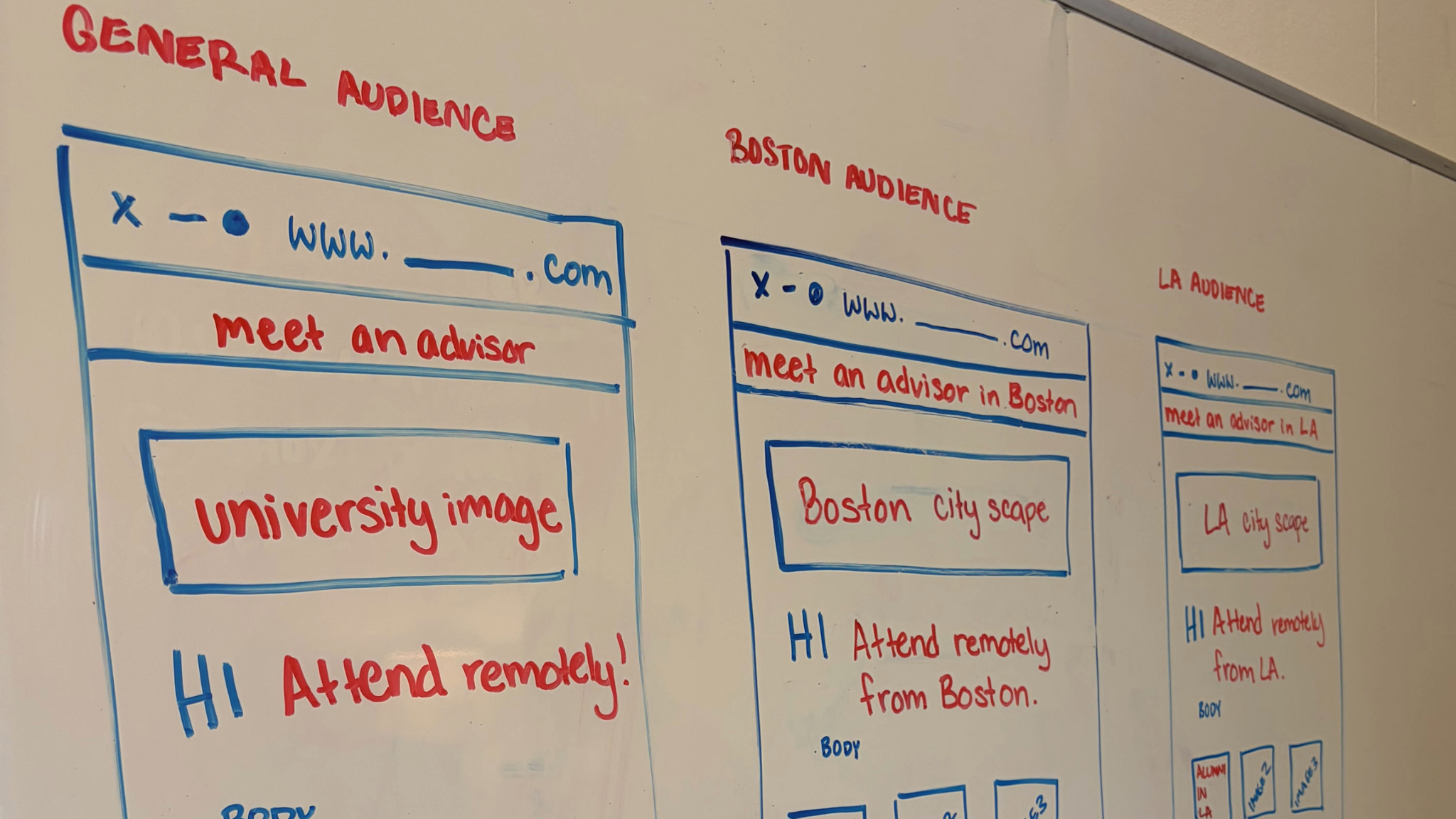
Rather than relying on one generic headline like "Your Local Home Comfort Experts," the business could personalize its H1 headline to reflect the visitor's region and the service they're interested in.
A visitor in Missoula might see:
"Reliable HVAC Repair in Missoula, MT"
Someone visiting from Bozeman might see:
"Heating and Cooling Services in Bozeman"
The underlying page stays the same. Only the headline changes.
A note on search intent: Search Console shows aggregate query data, not necessarily the exact organic search query of each individual visitor. Use those insights to develop relevant headline variations, then use location or campaign information to determine which version to display.
For paid campaigns, you can also use campaign-specific targeting to make sure the headline reflects the search or ad group that brought someone to your website.
2. Use sticky banners to surface location-specific information
Your main website content doesn't need to change completely to make the experience feel local. Sometimes, a small message in the right place makes all the difference.
Sticky banners are a great way to highlight information that matters to a particular audience without taking over the entire page.
For example, a regional healthcare organization with clinics in multiple cities could use a sticky banner to promote location-specific services or appointment availability.
Visitors in Missoula see: "Now accepting new patients at our Missoula clinic."
Visitors in Kalispell see: "Find care close to home in Kalispell."
Visitors outside those areas see a general message directing them to the locations page.
The banner stays visible as visitors scroll, making important information easy to find.
This approach also works for regional promotions, upcoming events, local service announcements, and campaign-specific calls to action.
With GeoFli, you can set up different banner variations and determine which visitors see each message based on their location or targeting rules. There's no need to create a separate page for every location.
3. Change your hero image to reflect the visitor's audience
Your website's hero section is often the first thing someone sees. The headline matters, but the image surrounding it helps establish whether the experience feels relevant, too.
Consider a tourism company offering experiences across several destinations.
Someone visiting from Montana might respond to imagery featuring familiar landscapes and nearby adventures. A visitor from California might be more interested in a different destination or experience.
The same idea applies to businesses with different customer segments or regional offerings.
A few examples:
By location: Show a local landscape, storefront, team, or recognizable landmark.
By campaign: Display the product, service, or promotion featured in the ad that brought someone to the site.
By audience: Highlight imagery that speaks to a particular customer group or industry.
Instead of maintaining multiple versions of your homepage, you can replace the hero image based on the visitor's targeting criteria.
The goal isn't to make your website look completely different for everyone. It's to make a few intentional changes that help visitors recognize what matters to them.
How to decide what to personalize first
Before changing anything, look at the information you already have.
Google Search Console can help identify the queries people use to find your website, while your advertising reports can show which campaigns and audiences are driving traffic.
Start by asking three questions:
What are people searching for? Identify relevant search queries and themes. Look for opportunities to make your headlines and messaging more specific.
Where are visitors coming from? Identify the cities, regions, or service areas that matter most to your business.
What brought them to your website? Consider whether they arrived through a paid campaign, organic search, email, or another source.
You don't need to personalize every element of your website at once. Start with one high-traffic page and a few meaningful changes.
For example, test a location-specific H1, a sticky banner highlighting a local offering, or a hero image that matches a particular campaign.
Keep your core messaging, brand identity, and important business information consistent. Personalization should make your website more relevant, not confusing or contradictory.
It's also important to keep your underlying website content useful and accessible to search engines. Dynamic content should support a good user experience rather than become a substitute for helpful, well-structured pages.
One website. More relevant experiences.
Managing a website for multiple locations doesn't have to mean managing dozens of nearly identical pages.
With the right personalization strategy, you can use the information you already have to make your website feel more relevant to different visitors. Headlines can reflect regional interests, sticky banners can highlight local opportunities, and images can change to match the audience or campaign.
GeoFli makes these changes possible on your existing website, without rebuilding pages or maintaining separate versions for every market.
Want to see what one personalized website could look like for your business? Explore GeoFli and see how you can create more relevant website experiences for every audience.
Thank you! Your submission has been received!
Oops! Something went wrong while submitting the form.
Does Website Personalization Slow Down Your Site? Let's Bust That Myth.
You'll learn whether website personalization slows down your site, what causes flicker and page speed issues, and how GeoFli delivers personalized website experiences without slowing down your website.
What AI Crawlers and Googlebot See When Your Website Is Personalized
You'll learn what Googlebot and AI crawlers actually see on a personalized page, why your default content matters more than most people expect, and how to personalize a site without anything that resembles cloaking.
You'll learn what happens in the seconds after a searcher clicks your ad, how Google grades the page they land on, and why matching that page to what they typed can lower your costs and bring in more leads.