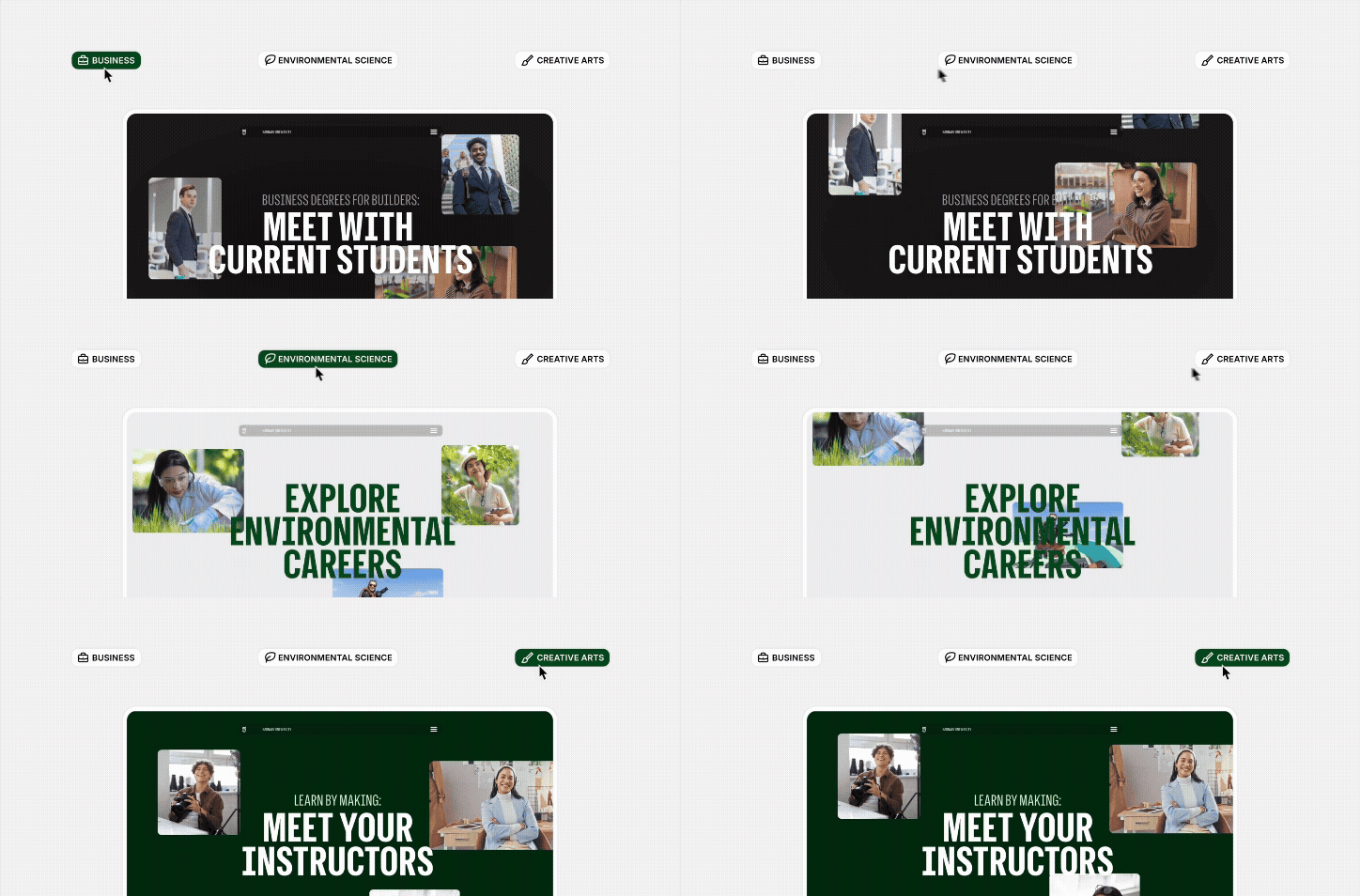
You'll learn how modern personalization software like GeoFli lets you show location-relevant content to every visitor without duplicating a single page or hiring a developer. You'll understand the difference between basic geo-detection and radius targeting, and why that extra precision can make a real difference in conversions.
You’ve probably seen the advice to create a separate landing page for every city your business serves. The advice is outdated.
However, you don’t have extra time on your hands (or a developer) to sit down and create fifty different landing pages for each state. Sort of a ridiculous ask. It sounds like a maintenance nightmare to constantly manage and update fifty different landing pages, right?
Personalize Website Content Based on IP Address Using Software:
There’s an easy way to personalize your website content based on location. GeoFli. It’s a personalization platform that lets you show different content to visitors based on where they're located without touching your code or duplicating a single page (well, you’ll need to add a small line of JavaScript, but that’s it).
You set the rules, define the regions, choose the images, and create the headlines. Then the rest is up to GeoFli. The result is a site that feels locally relevant to everyone who lands on it, whether you're serving two cities or two hundred.
Let's talk about geo-targeting vs. radius targeting.
Most customers we work with a website personalization software standpoint are using basic geo-detection. Your IP address gets read, a database maps it to a city or country, and the site adjusts accordingly. It's the reason you see prices in your local currency or get redirected to a regional homepage. It’s possible you’ve seen this (and you’ve seen GeoFli in action). Radius targeting is a level up.
Instead of asking "what city is this person in?", it asks “how close are they to somewhere that matters to my business?" You draw a ring around a point (a store, a service area, a venue, an event), and anyone who lands on your site from inside that ring gets a tailored experience. Everyone outside it sees your default; nothing changes for them.
Take the example of the marketing extension of our business: Pintler Group performance marketing. Pintler Group services a lot of Montana as the Top marketing agency in Montana. BUT, we also have clients across the country. It would be beneficial for us to launch some campaigns that drive users to a personalized landing page where the title updates to their local city.
The difference matters more than it sounds. City-level detection puts someone in "Chicago", but Chicago is 234 square miles. A visitor two blocks from your River North location and a visitor an hour south in the suburbs are technically in the same city. Radius targeting knows the difference.
Think of it this way: basic geo-detection is a weather forecast for the whole state. Radius targeting is a hyperlocal radar. Same data source, completely different resolution.
Personalization doesn't mean rewriting your whole site. It means swapping the right handful of words and images at the right moment.
This may seem overwhelming. You might be wondering, why is it so important to cater to my customers based on location? Isn’t a simple landing page that fits all enough? Here’s why it’s not.
Where someone is tells you a lot about what they need. A visitor browsing from Miami isn't looking for the same thing as someone in Minneapolis, even if they're on the same page, considering the same product. Location is context. And context is the difference between a website that feels relevant and one that feels generic.
Radius targeting in the real world
Let's make this concrete. Say you run a multi-location spa in Austin, Dallas, and Houston. Instead of building three separate landing pages (one for each city), you set up three radius zones in Geofli. A visitor landing on your site from within 15 miles of your Austin location sees a hero headline that reads "Austin's go-to spot for facials" with a CTA that books them into that specific location. The visitor coming from Dallas sees the same page, just with Dallas swapped in. Your Houston visitor? Same deal. One page. Three experiences. Zero extra pages to maintain.
It works just as well outside the multi-location model. A seasonal business can target visitors in colder northern markets with a winter-specific offer while everyone else sees the standard pitch. An event venue can surface location-specific urgency, "Serving the greater Nashville area", to visitors within driving distance without saying a word to someone browsing from across the country. The common thread: you're not changing the product. You're just making it feel like it was made for the person reading it.
What to swap and what to leave alone
You don't need to rewrite your site. In fact, the less you change, the cleaner the experience tends to be. 40% of your website visitors won't scroll below the fold of your website. When we change content to focus on personalization of the elements that carry the most persuasive weight, things change. All while leaving your core site structure untouched.
The highest-impact swaps are your hero headline, your primary CTA, your social proof, and your featured image. A headline that mentions a visitor's region immediately signals relevance. A CTA that says "Book your Missoula consultation" converts better than "Book a consultation". Not because it's clever or groundbreaking, but because it's specific. A testimonial from a recognizable neighborhood lands harder than a generic five-star review. A photo that reflects the visitor's environment, seasonal, regional, and cultural, feels much more intentional.
What to leave alone: your pricing, your navigation, your brand voice, and your core offer. Those should be consistent everywhere. Personalization is about context, not contradiction. The goal is for every visitor to feel like the page was written for someone like them, not to feel like they've landed on a completely different website.
Getting started (it's simpler than you think)
You don't need a developer, a new CMS, or a month-long project to make this work. Geofli layers directly over your existing site; no code changes and no page rebuilds.
The best place to start is your single highest-traffic page. Pick it, identify the three elements you want to personalize (headline, CTA, and one image is plenty), and set up your first location rule. Draw your radius, write your swapped content, and publish. That's a real, live, location-personalized experience (and it probably took you less than an hour).
From there, measure three things: localized click-through rate, and time on page broken out by region. Those numbers will tell you quickly whether your swapped content is resonating and will give you the confidence to expand.
The brands winning at local relevance aren't the ones with the biggest content teams or the most landing pages. They're the ones who figured out that a smarter single page beats fifty mediocre ones every time. Schedule a demo with GeoFli and see what one page done right can do.
Thank you! Your submission has been received!
Oops! Something went wrong while submitting the form.
You'll learn what happens in the seconds after a searcher clicks your ad, how Google grades the page they land on, and why matching that page to what they typed can lower your costs and bring in more leads.
You'll learn what a geo-targeted sticky banner does, why persistent placement outperforms static content, and how GeoFli lets you show the right message to the right visitor without touching your website's code.
GeoFli for Real Estate: One Website, Every Neighborhood
You'll learn how real estate agents and brokerages can use geotargeting to show buyers content built around the neighborhood they're actually searching in, without building a separate site for every zip code.