Beyond Location: 7 Signals You Can Use to Personalize a Website
You will learn how to use seven website personalization signals—including location, campaign source, UTM parameters, audience, referral source, visitor status, and behavior—to create more relevant website experiences without building separate pages for every audience.
Most website personalization starts with one question:
Where is this person?
That's a good place to start. Location tells you a lot. Someone in Chicago may need different information than someone in Seattle. A visitor within 10 miles of your business has a different reason to convert than someone browsing from 2,000 miles away.
But location isn't the only signal your website has.
By the time someone lands on your site, you may already know where they came from, which campaign they clicked, what audience they belong to, whether they've visited before, and what they've done on your site.
That's a lot of context.
And most websites ignore almost all of it.
The goal of personalization isn't to collect more information about every visitor. It's to use the information you already have to make the experience more relevant.
Here are seven signals worth paying attention to.
1. Location
Let's start with the obvious one.
Location is one of the simplest ways to make a website feel less generic.
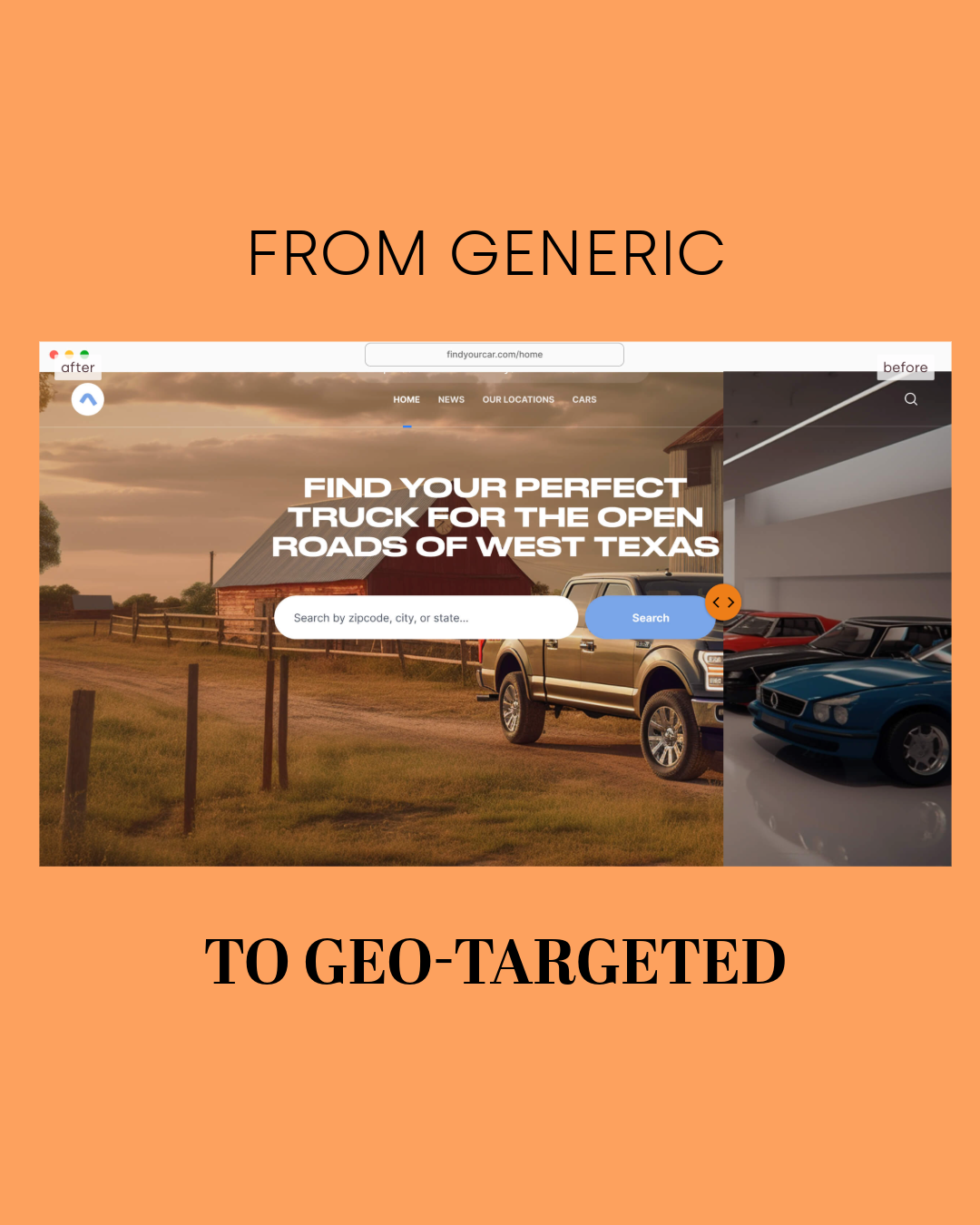
A visitor from Denver might see a different headline than someone from Chicago. A visitor within 15 miles of your storefront might see a location-specific offer. Someone searching from a city where you have a physical office could see that office's address, phone number, or services first.
The website doesn't need to become an entirely different website.
A few strategic changes can do the job.
Change the headline. Change the CTA. Swap the image. Surface a local testimonial. That's enough to make a page feel like it was built with the person visiting it in mind.
This is where GeoFli's traditional geo-personalization comes in. You can create experiences based on city, state, country, or radius without creating a separate landing page for every location.
One page.
Different experiences.
No giant collection of nearly identical pages to maintain.
And that's important because location-based personalization shouldn't create more work than it saves.
2. Campaign Source
Now let's get beyond location.
How did this person get here?
A visitor clicking a Google Ad isn't necessarily looking for the same thing as someone who found your website through an organic search.
Someone coming from an email campaign has different context than someone clicking an Instagram ad.
And yet, most of them land on the exact same homepage.
That's the disconnect.
You spent time figuring out the audience, writing the ad, choosing the offer, and getting the right person to click.
Then the website says:
Welcome. Here's the same thing everyone else sees.
Campaign source can tell you what brought someone to your site in the first place. Google Analytics uses traffic-source information such as source, medium, and campaign to help marketers understand where visitors came from.
That same context can inform the experience after the click.
A visitor from a free-trial campaign could see:
Start Your Free Trial
A visitor from a demo campaign could see:
See GeoFli in Action
Same website.
Same product.
Different reason for being there.
That's personalization.
3. UTM Parameters
UTM parameters are usually treated as an analytics tool.
And they are.
But they're also a really useful signal for website personalization. Your campaign URL can tell your website exactly which campaign brought someone there. So instead of just using that information to answer:
"Where did this conversion come from?"
You can also use it to answer:
"What should this person see when they arrive?"
Say you're running three campaigns for the same product. One is targeting healthcare marketers. One is targeting higher education. One is targeting ecommerce companies. You could build three landing pages, or you could send all three campaigns to the same URL and use the campaign parameters to change the experience.
The healthcare visitor sees healthcare messaging. The higher-ed visitor sees higher-ed messaging. The ecommerce visitor sees ecommerce messaging.
One page. Three experiences.
GeoFli's Dynamic URL targeting is designed specifically for this kind of use case. It reads the URL parameters attached to a visitor's click and uses them to determine which version of the page they see.
The campaign already knows who you're talking to. Your website should, too.
Pintler Group Team
4. Audience
Not everyone visiting your website is the same person. That sounds obvious. But you'd never know it from most homepages.
A B2B company might have:
Small business prospects
Enterprise prospects
Existing customers
Partners
Job candidates
A university might have:
Prospective students
Parents
Current students
Alumni
A healthcare practice might have:
New patients
Existing patients
Parents
Patients looking for specific services
Each audience has a different question they're trying to answer.
So why give everyone the same message?
The answer isn't necessarily to build a page for each audience. You can personalize the parts that matter.
A prospective student might see:
Find Your Program
An alumni visitor might see:
Stay Connected With Your University
An enterprise buyer might see:
Built for Complex Teams
A small business owner might see:
Marketing Without the Enterprise Price Tag
The underlying website hasn't changed.
The message has.
And sometimes that's all personalization needs to do.
Map of Montana
5. Referral Source
Here's another signal that's easy to overlook:
Who sent the visitor to you?
A visitor who arrives from a partner website already has some context.
So does someone who clicks through from an industry publication.
So does someone who arrives from a local news story.
That referral source can tell you something about what the visitor is interested in.
Imagine a cybersecurity company gets featured in an article about data privacy.
Someone clicks the company's link.
They land on the same homepage as someone who searched the company's name on Google.
That's a missed opportunity.
The referral gives you context. So use it.
The visitor coming from that privacy article could see security, compliance, or data-protection messaging front and center. Not because you're hiding anything from other visitors. Because you're making it easier for this visitor to find the information they already came looking for.
That's what good personalization does. It removes the extra work.
6. New vs. Returning Visitors
Your first interaction with someone shouldn't necessarily look like your fifth.
Think about a physical sales conversation. The first time someone talks to you, you're probably explaining what you do. The fifth time they come back, you're probably talking about pricing, implementation, or next steps. Websites can work the same way.
A new visitor might see:
New Here? Here's How It Works
A returning visitor might see:
Ready to Get Started?
You don't need to completely redesign the page between visits.
You might simply change the CTA.
Surface a deeper resource.
Promote a case study.
Move an introductory section further down the page.
The point is to recognize that someone who has already spent time with your brand doesn't necessarily need the same information as someone seeing it for the first time.
Personalization shouldn't make visitors feel watched.
It should make the next step feel obvious.
7. Behavior
This is where things get really interesting.
What did the person actually do while they were on your website? Did they visit your pricing page? Read three articles about the same service? Look at your case studies? Visit a specific product page? Start a form?
Those actions are signals. And they're often more useful than assumptions about who someone is.
If someone has visited your pricing page twice, they're probably past the point of needing a generic introduction to your company. The next experience could focus on what they're likely trying to figure out:
See What's Included
Compare Plans
Talk to Sales
The same idea can work with content.
If someone keeps reading articles about a specific service, that interest can inform what you prioritize the next time they interact with your site.
Behavior tells you something simple:
This is what this person cares about.
You don't need to guess.
Your website already has the evidence.
You Don't Need to Personalize Everything
Here's where website personalization can get out of hand.
You don't need 50 versions of your homepage. You don't need a different headline for every possible visitor. And you definitely don't need to change everything on the page.
In fact, that's probably the fastest way to make personalization complicated enough that nobody wants to maintain it.
Start small. Pick one signal, then change one or two high-impact elements. Your headline, your CTA, your featured image, your social proof.
That's it.
The goal isn't to create a completely different website for every visitor; it’s to make the website you're already using a little smarter.
Location Is Just the Beginning
Location tells you where someone is.
Campaign source can tell you what brought them there.
UTM parameters can tell you which campaign they responded to.
Audience tells you who you're talking to.
Referral source tells you who sent them.
New vs. returning status tells you how familiar they are with your brand.
Behavior tells you what they're interested in.
Put those signals together, and your website stops being a static page that looks the same for everyone. It starts responding to context, and that's the bigger idea behind website personalization.
It's not about making your website flashy. It's not about creating hundreds of landing pages. It's not about putting someone's first name in a headline and calling it personalization. It's about taking information you already have and using it to make the next interaction more relevant.
Your ads already know who they're targeting. Your analytics already know where visitors came from. Your website already knows what people are doing once they arrive.
Why not let all of that information actually change the experience?
That's where personalization gets interesting.
And you don't need a new website to do it. You just need to make the one you have smarter.
Want to Go Further?
If you're looking at personalization as part of a larger digital marketing strategy, Pintler Group can help you connect the pieces, from paid campaigns and audience targeting to the website experience that happens after the click.
And if you're ready to personalize the website itself, GeoFli lets you dynamically change website content based on location, campaign parameters, and other visitor signals without creating a separate page for every audience.
You'll learn what happens in the seconds after a searcher clicks your ad, how Google grades the page they land on, and why matching that page to what they typed can lower your costs and bring in more leads.
You'll learn what a geo-targeted sticky banner does, why persistent placement outperforms static content, and how GeoFli lets you show the right message to the right visitor without touching your website's code.
GeoFli for Real Estate: One Website, Every Neighborhood
You'll learn how real estate agents and brokerages can use geotargeting to show buyers content built around the neighborhood they're actually searching in, without building a separate site for every zip code.